
The 7 Best YouTube TV Remotes 2026 (Ranked & Compared)
Over the last few months, I’ve tried almost every type of streaming box/stick to try and work out which offers the best YouTube TV remote experience. I’m happy to report there are multiple great options available, all of which offer something unique – but one clear winner.
Ready to jump in? This is the best YouTube TV remote in October, 2026.
1. Apple TV 4K – Best YouTube TV Remotes
After trying every option on the list (extensively), my go-to option for watching YouTube TV content is the Apple TV 4K. Even if you don’t own any Apple computers or iPhones/iPads, it still offers the best YouTube TV experience. It’s fast, easy to use, has excellent picture quality and is the only option that has true multi-tasking capabilities.
With its powerful hardware and user-friendly interface, it’s an excellent choice for anyone looking to enjoy their favorite YouTube TV content effortlessly.
Pros and Cons

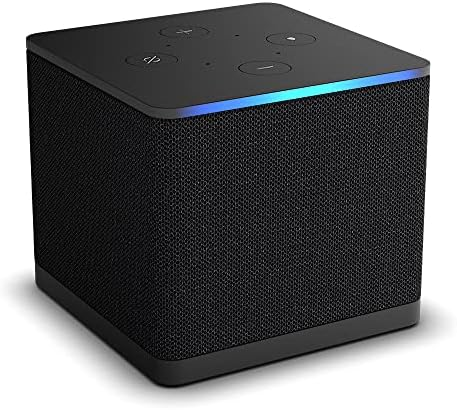
2. Amazon Fire Cube 4K – Best YouTube TV Remotes
The Amazon Fire TV Cube 4K is a really impressive device. Not only does it have heaps of inputs and killer wifi, but it also has one of the fastest chips on the market. This means that apps load super quickly, and there’s no lag moving around the interface.
The cube also looks awesome – I love the small glowing blue light that animates whenever you give Alexa a voice command. It also offers powerful 4K Ultra HD content for anyone who has a 4K TV and wants the very best movie experience.
Pros and Cons
3. Google Chromecast TV – Best YouTube TV Remotes
I’ve personally used the Google Chromecast TV since it was originally released a few years back. The Google Chromecast with Google TV is a great option for watching YouTube TV content due to its seamless integration with the YouTube TV platform.
With the Chromecast, users can easily access and stream YouTube TV content directly from the device (Android or iPhone), providing a user-friendly and convenient viewing experience.
Additionally, the device offers 4K HDR with Dolby Vision support, which delivers the best content quality available.
Pros and Cons


4. Amazon Firestick 4K – Best YouTube TV Remotes
At my house, I’ve currently got both the Apple TV and Firestick 4K setup. One in each living room. The FireStick 4K is truly an excellent device thats easy to use, and perfect for consuming content on YouTube (and all other streaming services).
For the price of the FireStick, you really can’t go wrong. Amazon also does a great job of regularly adding useful features that make your whole entertainment experience better and better.
Pros and Cons
5. Roku Express 4K – Best YouTube TV Remotes
This will sound super nerdy, but I bought a Roku Express 4K device just to compare it to the Apple TV and Firestick. Happy report that Roku makes an awesome streaming stick that’s perfect for all of your YouTube TV streaming. The remote is almost perfect and comes with heaps of features I wish other manufacturers would include.
If you’re looking for the most feature-packed streaming device/YouTube TV remote, Roku should be at the top of your list.
Pros and Cons


6. Roku Ultra LT 4K – Best YouTube TV Remotes
Want Roku’s ultimate streaming box? Look no further than the Roku Ultra LT 4K. The Ultra LT is a really well thought out streaming box that gives you basically everything you could ever need for Amazon, Disney, YouTube and Netflix.
It’s fast, easy to use and has one of the best-designed remotes I’ve ever used. I’m a huge fan of the headphones connecting directly to the remote. Perfect for when you have little kids and you want to have some headspace.
Pros and Cons
7. Google Chromecast – Best YouTube TV Remotes
The original Chromecast might be a few years old now, but it still offers one of the best ways to start streaming your favorite content.
The only downside of the Chromecast is that everything needs to be done from either your iPhone/Android device or your Chrome browser. Personally, once you get used to having a dedicated remote it’s hard to go back to not using one. In saying that, the Chromecast is so cheap now thats the easiest device to recommend to anyone who has an old TV and wants to upgrade it to a smart streaming device.
Pros and Cons

Conclusion
So there we have gang! I’ve used all of the devices above, and whilst they’re all great in their own way – I personally think the Apple TV 4K options the best YouTube TV experience. The remote is extremely well made, light and has a killer battery life. If you’re looking for the best option (even if you’re not an Apple user) I think you’ll absolutely love the Apple TV.
Questions? We Have Answers.
Get answers to a list of the most Frequently Asked Questions about which YouTube TV remote is the best option.


![Neuronwriter Review [Y]: The Best Content Optimization & SEO Tool?](https://bylukekelly.com/wp-content/uploads/2023/05/neuronwriter-768x432.png)


